Example: Modelling an enzymatic reaction with Michaelis-Menten kinetics
[1]:
%load_ext autoreload
%autoreload 2

import numpy
import pandas
import scipy
from matplotlib import pyplot
from IPython.display import display

import calibr8
import murefi
Overview: Fitting with calibr8 and murefi
Let’s assume that you want to model the Michaelis-Menten kinetics of an enzymatic assay for estimating the enzymatic activity (\(v_{max}\)). For this toy example, let’s assume that we measured the reaction product \(P\) by absorbance at a wavelength of 570 nm.
For the analysis, you need…
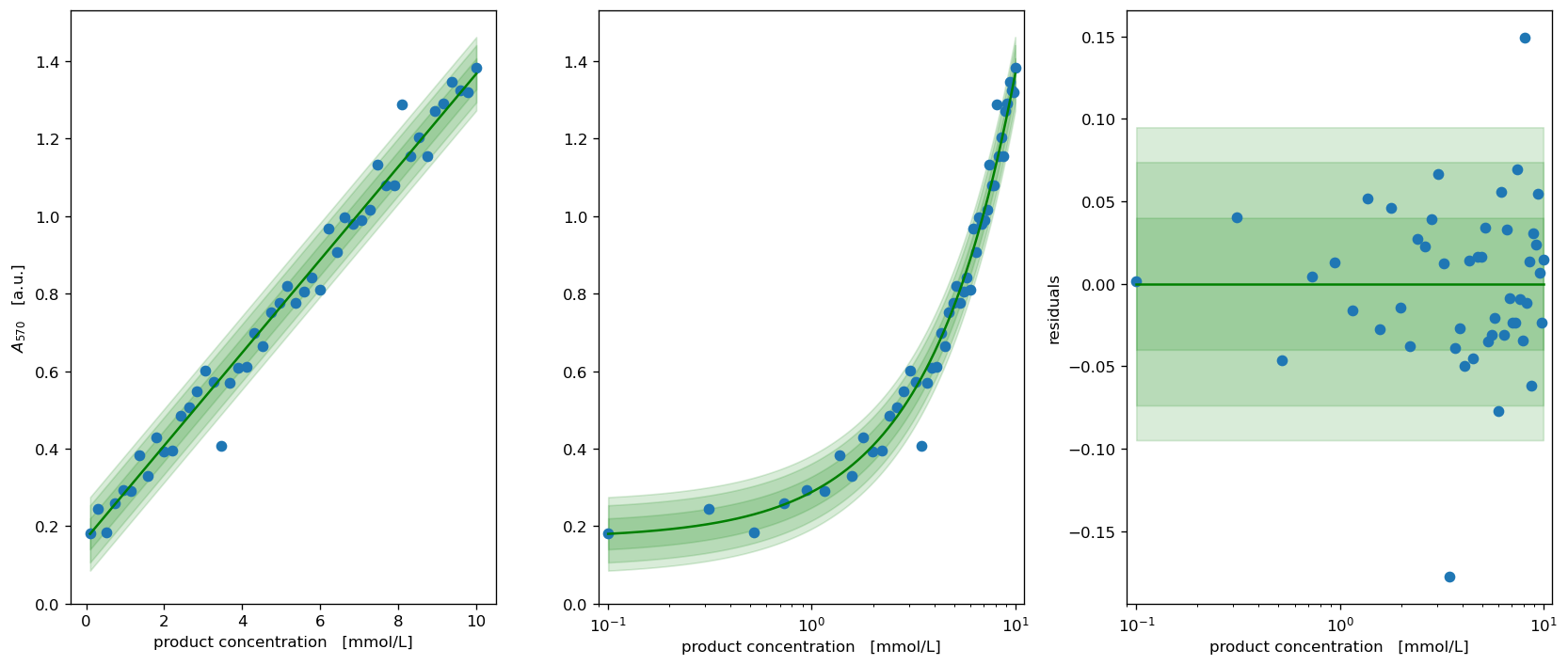
`calibr8calibration model <htps://calibr8.readthedocs.io>`__ of the \(P\) vs. \(A_{570}\) correlationCorrelation data for \(P\ [mmol/L]\) vs. measurement readout \(A_{570}\ [a.u.]\)
murefiODE model of Michaelis-Menten kineticsKinetic data of product accumulation (vectors of \(t\) and \(A_{570}\))
⚠ About 75 % of the code in this example is for preparing fake data. ⚠
Preparing Data & Models
1. & 2. Calibration model of product concentration
Because this part is shown in examples for calibr8, everything is condensed into one cell.
[2]:
class ProductAssayModel(calibr8.BasePolynomialModelT):
    def __init__(self):
        super().__init__(
            independent_key='P',
            dependent_key='A570',
            mu_degree=1,
            scale_degree=0,
        )

def observe_with_true_parameters(x):
    return scipy.stats.t.rvs(loc=0.17 + 0.12 * x, scale=0.03, df=3)

# generate fake calibration data with a linear relationship
numpy.random.seed(202103)
N = 48
X = numpy.linspace(0.1, 10, N)
Y = observe_with_true_parameters(X)

cm_product = ProductAssayModel()
theta_fit, _ = calibr8.fit_scipy(
    cm_product,
    independent=X, dependent=Y,
    theta_guess=[0, 0.2, 0.05, 5],
    theta_bounds=[(-2, 2), (0.001, 0.5), (0.001, 0.5), (1, 10)]
)
fig, axs = calibr8.plot_model(cm_product);
for ax in axs:
    ax.set_xlabel('product concentration   [mmol/L]')
axs[0].set_ylabel('$A_{570}$   [a.u.]')
axs[1].set_ylabel("")
axs[0].set_ylim(bottom=0)
axs[1].set_ylim(bottom=0)
fig.tight_layout()
pyplot.show()
3. ODE Model of enzyme kinetics
To describe the kinetics of our enzyme of interest, we’ll use the ODEs of the Michaelis-Menten kinetics:
For our data analysis we’ll have to implement it with murefi:
[3]:
class MichaelisMentenModel(murefi.BaseODEModel):
    def __init__(self):
        self.guesses = dict(S_0=5, P_0=0, v_max=0.1, K_S=1)
        self.bounds = dict(
            S_0=(1, 20),
            P_0=(0, 10),
            v_max=(0.0001, 5),
            K_S=(0.01, 10),
        )
        super().__init__(
            independent_keys=['S', 'P'],
            parameter_names=["S_0", "P_0", "v_max", "K_S"],
        )

    def dydt(self, y, t, theta):
        S, P = y
        v_max, K_S = theta

        dPdt = v_max * S / (K_S + S)
        return [
            -dPdt,
            dPdt,
        ]

model = MichaelisMentenModel()
4. Data of enzymatic reaction
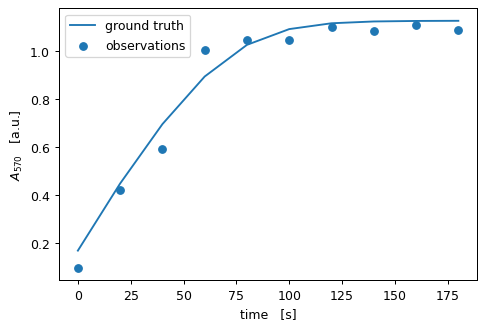
Because this is an example notebook, we’ll have to fake our data… This can be done by
simulating a trajectory with our
modelandusing the
observe_with_true_parametersfunction to make noisy observations of the product concentrations with the ground truth \(A_{570}\)/\(P\) relationship
[5]:
# generate ground truth data at 10 time points
theta_true = (8, 0, 0.16, 2.5)
rep_groundtruth = model.predict_replicate(
    # S_0, P_0, v_max, K_S
    parameters=theta_true,
    template=murefi.Replicate.make_template(tmin=0, tmax=180, independent_keys='SP', rid='A01', N=10)
)

# use error model to make noisy observations of the ground truth
rep_observed = murefi.Replicate(rid='A01')
rep_observed['A570'] = murefi.Timeseries(
    t=rep_groundtruth['P'].t,
    y=observe_with_true_parameters(rep_groundtruth['P'].y),
    independent_key='P',
    dependent_key='A570'
)

# pack generated data into Dataset
dataset = murefi.Dataset()
dataset[rep_observed.rid] = rep_observed


fig, ax = pyplot.subplots(dpi=90)
ax.scatter(rep_observed['A570'].t, rep_observed['A570'].y, label='observations')
# use error model to project groundtruth onto dependent variable axis
ax.plot(rep_observed['A570'].t, cm_product.predict_dependent(rep_groundtruth["P"].y)[0], label='ground truth')
ax.set(xlabel='time   [s]', ylabel='$A_{570}$   [a.u.]')
ax.legend()
pyplot.show()
Estimation of model parameters
With murefi, one can fit an entire dataset while sharing parameters across replicates. The sharing of parameters is achieved via a data structure called ParameterMapping.
The ParameterMapping is created from a table that maps each replicate in the dataset to a vector of parameters. Parameters that shall remain fixed are set as float while flexible parameters are identified by a str.
Here, we have just one replicate, so the ParameterMapping remains simple:
[6]:
df_mapping = pandas.DataFrame(columns='rid,S_0,P_0,v_max,K_S'.split(',')).set_index('rid')
# we'll fix S_0=8.0 and fit only the remaining parameters
df_mapping.loc['A01'] = (8.0, 'P_0', 'v_max', 'K_S')

# create the ParameterMapping object
pm = murefi.ParameterMapping(
    df_mapping,
    guesses=model.guesses,      # fed as dict where the key is the name of the parameter
    bounds=model.bounds         # same as guesses
)
display(pm.as_dataframe())
display(pm)
| S_0 | P_0 | v_max | K_S | |
|---|---|---|---|---|
| rid | ||||
| A01 | 8.0 | P_0 | v_max | K_S |
ParameterMapping(1 replicates, 4 inputs, 3 free parameters)
The ParameterMapping object pm can now be used to create an optimization objective for a Dataset & given a ParameterMapping. To connect model predictions with data, it requires a list of calibr8.CalibrationModel.
Without a calibration model, the data will not contribute to the fit!
[7]:
obj = murefi.objectives.for_dataset(
    dataset,
    model,
    pm,
    # no need for a substrate calibration model, because there's no data
    calibration_models=[cm_product]
)

# The objective function can be evaluated at the initial guess to see if everything works as expected:
print(f'Objective at initial guess: {obj(pm.guesses)}')
Objective at initial guess: -9.793625758398255
Now the model can be fitted with scipy.optimize.minimize.
If fitting does not work, check the following most common problems:
objective could evaluate to
nan(check this withobjective(pm.guesses))initial guesses might be too unrealistic
bounds may be too open (invalid predictions, hard to find the optimum)
bounds may be too restrictive (fit hits the bound)
bounds may be unrealistic (e.g. not preventing negative \(K_S\))
calibration models using the \(Normal\) distribution often cause numerical problems
[8]:
model_fit = scipy.optimize.minimize(
    obj,
    pm.guesses,
    bounds=pm.bounds
)
model_fit
[8]:
      fun: -13.103571329566996
 hess_inv: <3x3 LbfgsInvHessProduct with dtype=float64>
      jac: array([-1.38555834e-05,  1.84721536e+01,  4.38937775e-04])
  message: b'CONVERGENCE: REL_REDUCTION_OF_F_<=_FACTR*EPSMCH'
     nfev: 168
      nit: 23
     njev: 42
   status: 0
  success: True
        x: array([1.54038219, 0.        , 0.13220258])
Visualizing the optimization result
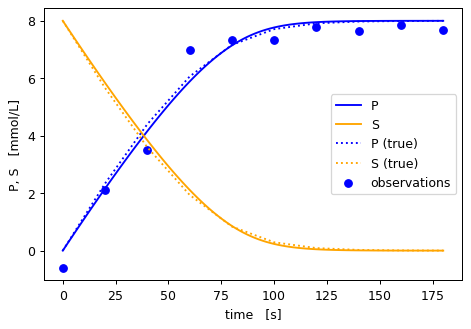
To visualize the result, we’ll use the ParameterMapping.repmap method to transform the global parameter vector (3 entries) into a parameter vector for our model (4 entries). This is necessary because the global one has a different order and is missing parameters that were fixed.
Then, we can make a high-density prediction using our model:
[9]:
# first make a high-density prediction
rep_fit = model.predict_replicate(
    parameters=pm.repmap(model_fit.x)['A01'],
    template=murefi.Replicate.make_template(tmin=0, tmax=180, independent_keys='SP')
)

fig, ax = pyplot.subplots(dpi=90)
colors = dict(P='blue', S='orange')

# plot data, transformed via the error model into the independent unit
t_obs = rep_observed['A570'].t
y_obs = cm_product.predict_independent(rep_observed['A570'].y)
ax.scatter(t_obs, y_obs, label='observations',color=colors['P'])

# plot all timeseries of the fit
for ykey, ts in reversed(rep_fit.items()):
    ax.plot(ts.t, ts.y, label=ykey, color=colors[ykey])

# plot all timeseries of the groundtruth for comparison
for ykey, ts in reversed(rep_groundtruth.items()):
    ax.plot(ts.t, ts.y, label=ykey + ' (true)', linestyle=':', color=colors[ykey])

ax.set_xlabel('time   [s]')
ax.set_ylabel('P, S   [mmol/L]')
ax.legend()
pyplot.show()
[10]:
%load_ext watermark
%watermark -n -u -v -iv -w
Last updated: Mon Mar 29 2021

Python implementation: CPython
Python version       : 3.7.9
IPython version      : 7.19.0

murefi    : 5.0.0
scipy     : 1.5.2
matplotlib: 3.3.2
numpy     : 1.19.2
pandas    : 1.2.1
calibr8   : 6.0.0

Watermark: 2.2.0